
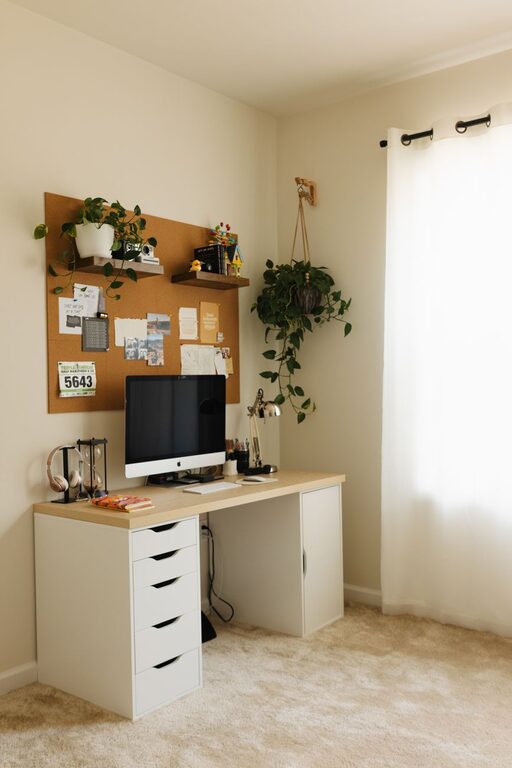
Creating a home workspace that is both cozy and functional can make a big difference in your productivity and overall well-being. Whether you work remotely full-time, need a spot for occasional tasks, or just want a pleasant area to focus, designing the right environment is key. Below are practical tips to help you set up a workspace that feels inviting and supports your daily work needs.
Choose the Right Location
The first step in creating an effective home workspace is selecting the best spot in your home. Consider these factors:
– Natural Light: Pick a space near a window to take advantage of natural light, which can boost mood and reduce eye strain.
– Quiet Environment: Look for a quieter area away from high-traffic zones if possible, to minimize distractions.
– Space Availability: Ensure there’s enough room for your desk, chair, and storage without feeling cramped.
If space is limited, a corner of a bedroom or living room can work well with the right setup.
Invest in Comfortable and Supportive Furniture
Comfort is essential for long hours spent working. Here’s what to focus on:
– Ergonomic Chair: A good chair supports your back and encourages proper posture.
– Desk Height: Your desk should match your sitting height so your arms rest comfortably while typing.
– Adjustable Options: Consider adjustable desks or chairs to allow movement and varied working positions.
Adding a footrest or seat cushion can also enhance comfort.
Organize Efficiently to Maximize Functionality
A clutter-free workspace helps maintain focus. Try these organization tips:
– Storage Solutions: Use shelves, drawers, or baskets to keep supplies tidy and within reach.
– Desk Layout: Keep only essential items on your desk. Store extra materials elsewhere.
– Cable Management: Use clips or boxes to organize cords and prevent tangling.
– Digital Declutter: Regularly clean your computer desktop and files to stay organized digitally.
Labeling containers and organizing by category can simplify finding what you need quickly.
Personalize Your Space to Feel Cozy
Adding personal touches makes the workspace inviting and reduces stress:
– Plants: Small plants bring life and fresh air to your area.
– Soft Textiles: Use a cozy rug, cushions, or a throw blanket.
– Artwork and Photos: Decorate with framed pictures, calming artwork, or inspiring quotes.
– Lighting: Along with natural light, use desk or floor lamps with warm bulbs to create a relaxing atmosphere.
Choose colors and decor that make you feel comfortable and motivated.
Optimize Lighting for Comfort and Productivity
Proper lighting reduces eye strain and fatigue. Consider these tips:
– Natural Lighting: Maximize daylight but avoid glare by positioning your desk perpendicular to windows.
– Task Lighting: Use adjustable desk lamps to illuminate your work area precisely.
– Ambient Lighting: Overhead lighting should be soft and evenly spread to reduce harsh shadows.
If your workspace lacks natural light, choose bulbs that mimic daylight to maintain energy levels.
Incorporate Technology Thoughtfully
Technology is central to most home workspaces, but it’s important to manage it wisely:
– Screen Position: Place monitors at eye level and about an arm’s length away.
– Keyboard and Mouse: Use ergonomic models to prevent strain.
– Headphones: Noise-cancelling headphones can improve concentration.
– Charging Stations: Keep gadgets powered with designated charging areas to avoid clutter.
Regularly update your software and hardware for smooth and efficient work.
Set Boundaries to Separate Work and Home Life
Having a defined workspace helps maintain work-life balance:
– Physical Barriers: Use room dividers or curtains if possible.
– Work Hours: Stick to consistent start and end times.
– Clear Desk Policy: At the end of your workday, clear your workspace to mentally shift out of work mode.
Sharing your schedule with family members can minimize interruptions.
Add Comfort with Small Details
Small touches can improve your comfort and productivity:
– Water Bottle: Keep hydrated with a refillable bottle nearby.
– Snack Station: Healthy snacks within reach prevent unnecessary breaks.
– Timer: Use a timer for work sessions and breaks to stay focused.
– Footwear: Comfortable shoes or slippers can enhance your comfort if you stand or move around.
Consider adding a small fan or heater for temperature control.
—
Designing a cozy and functional home workspace is about balancing comfort, organization, and efficiency. By choosing the right location, investing in ergonomic furniture, personalizing your area, and managing lighting and technology thoughtfully, you can create an environment that supports your best work every day. With these tips, your home workspace can become a place where productivity and comfort go hand in hand.